John Locke’s interleaved copy of the Bodleian Catalogue is one of the longest items on Digital Bodleian. Its unusual composition demands some lateral thinking during its description!
The joy (and challenge) of working with rare books and manuscripts often lies in no two items ever being identical. Each has its own quirks: a missing quire, a patch of palimpsested text, a stub or two, or anything else from the array of things that make these objects unique.
Amidst this eclecticism, one of the most important parts of digitisation is an effective description. This comes all the way back to pagination (or foliation) of the object; if it isn’t navigable, its utility is compromised. Objects conventionally bound and following a relatively conventional sequence are the norm, meaning surprises are few and far between. The rules can be bent to accomodate slight deviations without much issue. However, what do we do when an object tears up (or, more accurately, interleaves) the rulebook?
Introducing Locke 17.16
Bodleian Library Locke 17.16 was 17th century philosopher and physician John Locke’s personal copy of the 1674 edition of the Bodleian’s printed library catalogue (Catalogus impressorum librorum Bibliothecæ Bodleianæ in Academia Oxoniensi). This is a hefty volume. Arranged alphabetically by author, it comprises two parts (containing letters A-M and N-Z respectively) and totals around 750 pages.
As one of the most influential thinkers of the Enlightenment, Locke was understandably well-read1. It stands to reason a copy of the Bodleian’s catalogue would form part of his collection. To supplement the catalogue with details of his personal holdings, Locke had it interleaved. Interleaving is the process of inserting a piece of writing paper between each of the printed leaves. Naturally, this almost doubles the length of the work. In the case of Locke 17.16, this increases the number of images comprising the object from what would have been an already-hefty 800-ish to a truly mighty 1,682! The below image of the head of the object demonstrates its remarkable size.
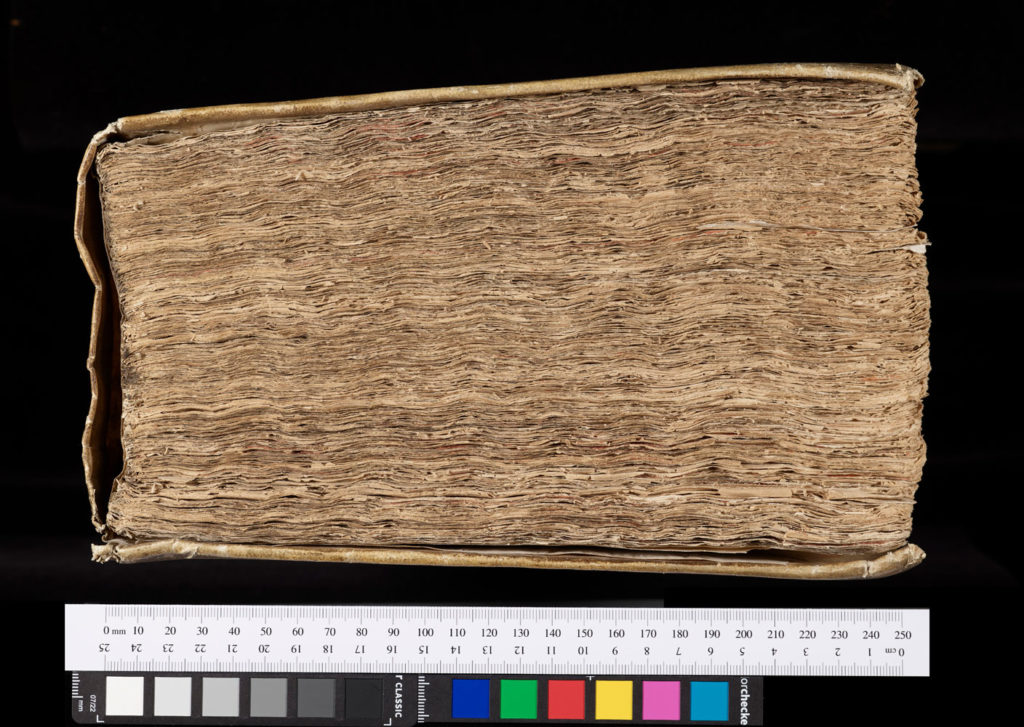
Above: Photograph of the head of Bodleian Library Locke 17.16, demonstrating the remarkable thickness of the volume.
Tackling the labelling
Labelling the printed sequence found within this object would normally prove straightforward. We wouldn’t rely on the printed page numbers at the top of each page, as these were typically rife with errors in earlier printed works. Instead we would use the signatures2 which were used as a guide for the printers when collating a book. However, this only solves a problem for roughly half of the pages within this work and we are still faced with the problem of the interleaves.
At present we are dealing with a sequence that looks something like this, from the start of the main sequence:
[...]
Img. 18: Interleaf
Img. 19: fol. A1r
Img. 20: fol. A1v
Img. 21: Interleaf
Img. 22: Interleaf
Img. 23: fol. A2r
Img. 24: fol. A2v
Img. 25: Interleaf
Img. 26: Interleaf
Img. 27: fol. A3r
Img. 28: fol. A3v
Img. 29: Interleaf
[etc.]
This is a start, but it is of no use from a navigability perspective to have hundreds of pages with the same names, especially when many contain unique content. The user needs a way of being able to locate a page with some form of unique identifier. Before this problem is tackled, it’s helpful to understand exactly how these interleaves were used by Locke to complement the printed work.
Each printed page has an interleaved counterpart. For recto sides of a printed leaf, the interleaf is preceding. For verso sides, the interleaf is following. Locke used these leaves to write down the contents of his personal library, alongside print pages where entries for a given author would appear in the original catalogue.
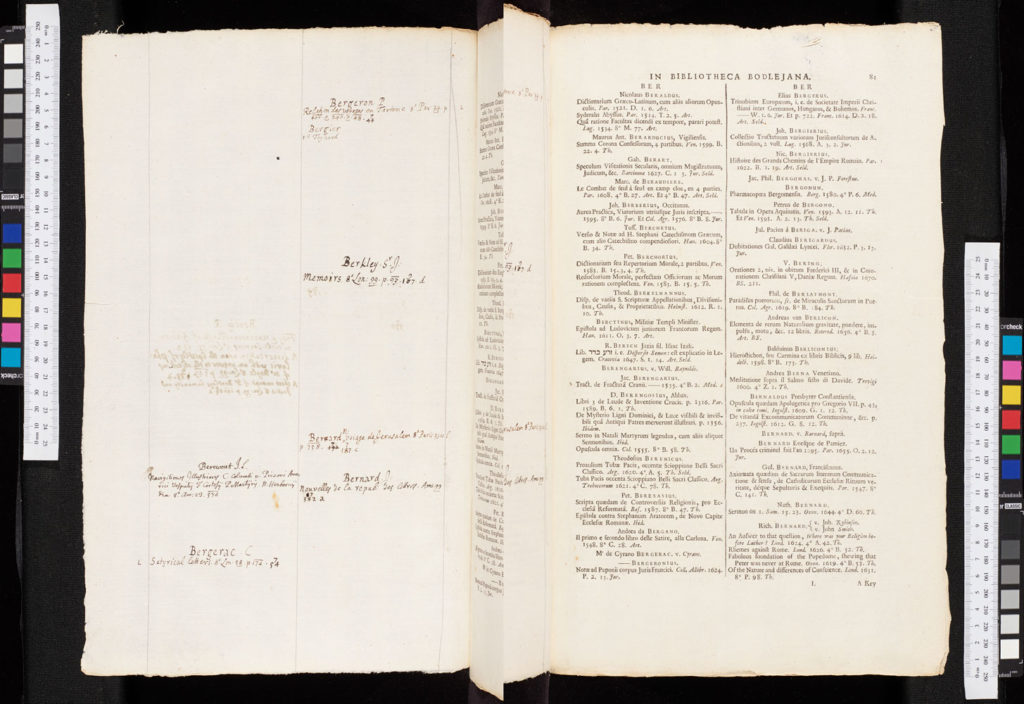
Above: Composite image showing fols. L1r (right) and its interleaf counterpart (left). The interleaf shows John Locke’s handwritten notes, for works whose authors would be found at the corresponding page in the print work.
Devising the solution
As these interleaves are direct counterparts to their corresponding print pages, it made sense to give them a name linking them to the print content. After discussing the issue, my line manager suggested MS notes, fol. [print page fol.] which was an elegant solution that not only gave a descriptive summary but created a link to the printed material. The following excerpt shows what the resultant pagination looked like:
[...]
Img. 18: MS notes, fol. A1r
Img. 19: fol. A1r
Img. 20: fol. A1v
Img. 21: MS notes, fol. A1v
Img. 22: MS notes, fol. A2r
Img. 23: fol. A2r
Img. 24: fol. A2v
Img. 25: MS notes, fol. A2v
Img. 26: MS notes, fol. A3r
Img. 27: fol. A3r
Img. 28: fol. A3v
Img. 29: MS notes, fol. A3v
[etc.]
Many of the interleaves were understandably blank; the contents of Locke’s library did not extend quite as far as requiring the use of every page! In these cases, given there was no content for which discoverability was a firm requirement, these were simply given as Blank page, leaving us with the object as paginated on Digital Bodleian now:
Notes and References
- Blog post featured image: Illustration on fol. *1r of Bodleian Library Locke 17.16, © Bodleian Libraries, University of Oxford.
- Blog post images: Locations as described in captions, © Bodleian Libraries, University of Oxford.
- Silver, S. (2015). John Locke’s Library. The Mind is a Collection. Retrieved 9 August 2023, from https://web.archive.org/web/20220707143830/http://www.mindisacollection.org/lockes-libr ↩︎
- Bodleian Libraries (2014). Working with Foliation and Signatures. Retrieved 9 August 2023, from https://web.archive.org/web/20230809145204/http://bav.bodleian.ox.ac.uk/news/working-with-foliation-and-signatures ↩︎
Leave a Reply